Speaker Skills Part 2 — Performance and Delivery Tips and Tricks

Amy Kapernick
Director of Conference Content
In this series of blog posts, we’ll be talking about the skills and giving tips, tricks and feedback on planning, creating and presenting a talk. This comes from our experience as tech conference speakers, but most of the advice is applicable in a wide variety of settings and talk topics.
In the last part, we looked at the initial stage of preparing a presentation: planning it out, choosing your format, building out the structure, and then building your slide deck. In this part, we’ll be looking at the performance, tips, and tricks for delivery, and techniques on the day.
The Basics
Timing
Timing all takes into account the length of your presentation and makes sure you stick to time. While it’s hard to work timing out when you first start presenting, it’s important to practice and work out how close you are, and ways that you can mitigate either running behind or ahead on the day. The event organisers have given you a certain length of time slot, and it’s important to stick to it. Most of the time they understand going under the length a little (think about 10% of the allotted talk length as a buffer), but going over your talk length shows a lack of respect to the event organisers, the audience and the other speakers (and I’ve seen presentations go 10–15min over the allotted length).
When you practice, keep track of how long each section typically is, and work out what can be tweaked when necessary. It helps to either have a stopwatch that can track each section, or keep an eye on the speaker notes timer. In lieu of a separate app, you can add timings to your speaker notes, to keep an eye on where you should be up to at that point.
Troy Hunt on Twitter: "Actually, let me share this with all my fellow speakers: I absolutely live by this approach, nail the timing of every talk you do down to the second! https://t.co/3cfjRP1Hli (opens in a new tab) pic.twitter.com/jh8WDIOuOr / Twitter"
It’s also worth finding out from the organisers if someone in the room will be keeping track of time. For example, some events will have someone in the room who’ll give you a signal at 10min, or 5min remaining and then let you know when time is up, it can often be better to have someone in front of you giving the signal in case you miss it on your speaker notes.
When practicing, it’s also worth keeping track of whether you talk faster or slower on the day. When nervous, most people have a tendency to talk faster, which means you need to prepare some more content. But over time that may change, when you get more comfortable on stage you may start to talk slower or elaborate more throughout your presentation and need to prepare less content than before.
Breathe
It sounds like an obvious one, but make sure you remember to breathe when you’re presenting. When you’re nervous, or getting excited about what you’re presenting on, it's easy to get lost in the moment and find we’re talking faster and faster, and maybe we’ve forgotten to stop and take a breath.
Maybe we’ve forgotten to stop and take a breath
Whenever you find yourself feeling out of breath, stop and take a deep breath, take a sip of water and take the chance to recover. If you find you forget to take a breath, try adding reminders to your speaker notes, an emoji or note to stop and take a breath for a second.
Be Silent
The same as we utilise white space in a website design, we should also utilise silence in a presentation. There is a right amount of white space to include in our presentation, a chance to stop and recover and let what you’ve just said sink in with the audience.
Purposefully pausing is one of the most important tools that a speaker has, it’s not only a chance to rest but it can also help to shock the audience back into paying attention, as they digest what you’ve just said or what is currently displaying on the screen.
Stopping talking recaptures the audience’s attention and adds drama
If you have a tendency to forget to stop and breathe, make notes on your slides where would be a good chance to pause, and use the opportunity to trigger the audience and take a drink of water so you can recover, before moving on.
Be Prepared
We all know the deal, if something can go wrong it probably will, so make sure you’re prepared for what could happen on the day. Make sure that you have a backup of your presentation (on a device other than your laptop), and if possible be prepared to present from someone else’s device.
If you’re doing a live demo, make sure you have a backup recording of your demo (or small video snippets of what you’re planning to present), include them in your slides so you can play them easily if you need them.

giphy.com
The more you present, the more chances that you’ll end up encountering AV issues at some point, so it’s better to be prepared before it happens. It could be the entire AV system not working (I’ve had to present without anything before), it could be no audio, it could be interference with the speakers, it could be no working internet. I’ve been at a conference where a speaker gave six presentations across the event, and he experienced serious AV issues with 4 of them. I’ve even seen while at a Microsoft conference, there be issues that took down the entire Azure portal (only for about half an hour), but that just goes to show that you’re never safe.
Nerves
When you stand on stage in front of a group of people (or prepare to do so), your body thinks it’s under attack and invokes the fight or flight response. This means your body starts producing adrenaline, readying you to fight or run away, and when you don’t use that adrenaline it invokes feelings of nausea (which doesn’t tend to help the nerves).
Although the nerves will get easier, they never truly go away, whether you’re giving the keynote to thousands of people at an international conference or talking to a small group at a community event. Different events will affect you in different ways, new talks and live demos might increase the nerves again and presenting online might make you more or less nervous (I can never relax when presenting online, my whole body stays tense the entire time). If you take some time off presenting, you’ll likely have to learn to deal with nerves all over again.
The first thing to do is learn to reduce your nerves enough that you can deal with them. This is different for everyone, so find what calms you best, it could be:
- Listening to music (doesn’t have to be relaxing music either, I find deep house works best for me)
- Having a cup of tea (try avoiding caffeine heavy teas though, adrenaline doesn’t need the help)
- Distract yourself, chat to friends or fellow speakers
- Take a quiet time out, see if the event has a quiet space where you can step away and relax yourself
It will also help to practice diaphragmatic breathing. When the body goes into fight or flight, your heart rate increases and the body produces adrenaline to prepare for battle. Diaphragmatic breathing involves breathing with your belly rather than your chest, and tricks the body into a state of rest and recovery. Practicing this kind of breathing helps your body to calm down and can keep nerves at a manageable level before you get on stage.
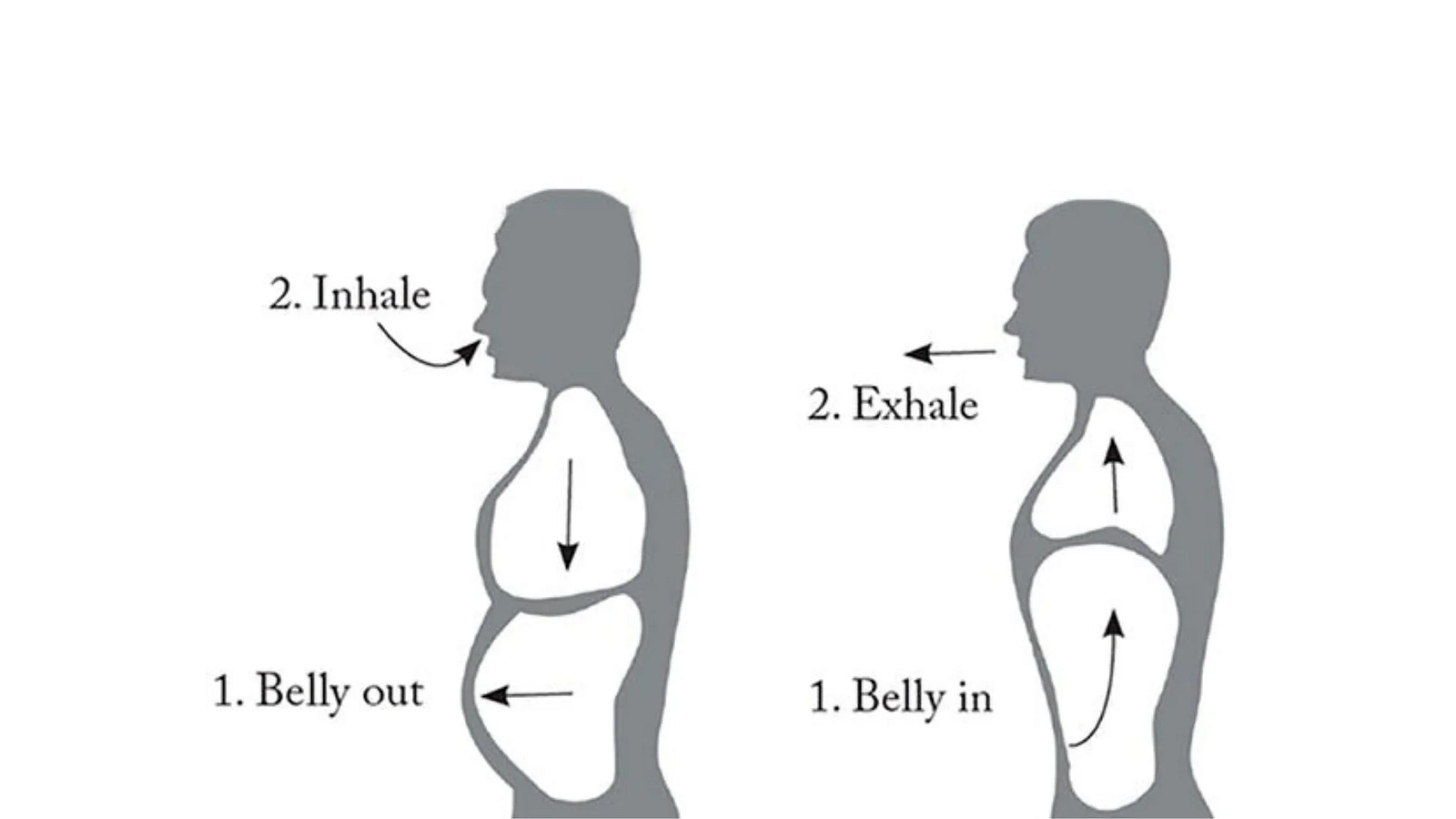
Diaphragmatic breathing involves strengthening the diaphragm, pushing the belly out when you breath in and pulling it in when you breath out. The chest should stay still while the belly does all the work — The Benefits of Diaphragmatic Breathing Technique — Optimal Breathing (opens in a new tab)
Work out what relaxes you best, and use it in the leadup to your presentation. When the nerves are manageable you can then use them and the adrenaline your body has produced to your advantage. Adrenaline helps you wake up and provides energy as well as altering your voice. We talked about practicing until you sound bored, when you get on stage the adrenaline will then energise that boredom and give you an excited, confident stage presence.
You may even find that you enjoy it, so embrace the nerves and the adrenaline rush. Some people like sky diving or base jumping, some people swim with sharks or drive fast cars to get that same rush, but me, I stand in front of hundreds of people and talk tech.
Eye Contact
Have you ever been in a presentation where the speaker makes eye contact with you and you feel like they’re talking to you directly? It’s a trick, you don’t have to actually make eye contact, just look in someone’s direction and it has the same effect.
Don’t dart your eyes around the room though, it gives the impression that you’re nervous. Find a few people around the room and make eye contact with them. Keep cycling through and coming back to them (at regular but not too often intervals), preferably find people who look engaged.
Movement and Gestures
As much as you monitor your eye contact, make sure your movements are deliberate and big so they can be seen at the back of the room and look intentional rather than the result of nerves. You can use the gestures to anchor ideas or prompt the audience, eg.
- Raise your hand if you want people to answer a question out loud rather than just internally
- Use your fingers when counting points or steps
- Point at things on the slide with your arm rather than your laser pointer, easier for people at the back of the room to see
Questions
After dealing with the nerves and everything else associated with getting on stage, we’re then confronted with an even more terrifying choice — do we take questions? If we do take questions, what if someone asks a question we don’t know the answer to? What if someone asks a question that isn’t really a question? What if someone tells us we’re wrong? What if no one asks any questions?
Questions can be powerful, they can allow you to re-enforce your main points and allow you to fill in any missed bits or sections that you glossed over. You can ask yourself a question to get the ball rolling, or have a friend in the audience who can help prompt you with one. Asking for questions can also help you fill in remaining time if you happen to finish early.
Getting a question from the audience can also allow you to see another point of view, how someone else views your talk or highlight content areas you didn’t think of including. It can allow you to see how someone with different level of expertise or from another area might understand your content and help you to improve the presentation for next time.
Like we discussed in the first post of this series, it’s ok to not know everything, so if someone asks a question and you don’t know the answer you can say I don’t know or defer it until later. Something like “That’s an interesting question, how about we talk about it after?” or “I’m not too sure, come and find me after and we can discuss it further”.
It’s also worth letting the audience know if you’re available for questions after, throughout the rest of the day, or if they can contact you outside the event. There’s no obligation to do this, and you can let them know whatever restrictions you like, for example maybe you’ll happily take questions after but they need to give you an hour off first to recover after your presentation.
If you’re feeling nervous about taking questions, check to see if the event organisers can help you to moderate them. Maybe there’s someone in the room who can help to moderate questions from the audience and deal with arguments or questions that aren’t questions. The most important thing to remember though, is it’s also perfectly ok to opt out of questions altogether. Taking questions isn’t a requirement, so if you don’t want to allow questions at the end, that’s a valid option.
Humour
A lot of the time people talk about opening with a joke, or including humour throughout a talk. This isn’t a requirement and depends on a number of things including you and your presentation style, the talk topic, the audience and the event that you’re presenting at.
If you want to include jokes, try including a small, safe joke at the start of your talk, and use the audience’s reaction to gauge future performance. If they don’t react well at the beginning, maybe give it a miss and continue with a humourless presentation, otherwise you risk offending or putting the audience offside and ruining an otherwise good presentation.
Live Demos
Live demos are a special kind of nightmare when it comes to presenting, both for the presenter and also for the audience at times. At the bare minimum if you’re doing a live demo make sure that you have a video recording as a backup. Even if you think that nothing could go wrong, you have no guarantees (see previous section on being prepared).
Make sure you have any logins or multi factor logins sorted for the live demo, and have a think about it anything needs a physical security key to login, and if you can login on someone else’s device if you need to switch.
When planning a live demo, it’s worth having a think about whether this is the best option and whether you could do something else instead. The issue with live demos is it’s hard to be able to talk through what you’re doing while you’re doing it, especially at the beginning. Does the presentation have the same effect if you just pre-record your coding segments, or show the sections of code on your slides, leaving you free to explain the code and what it’s doing to the audience.
John Allsopp on Twitter: "this definitely needs more than a tweet, but there's two aspects that seem clear (I spend a lot of my time editing an transcribing presentation and working to make them as accessible as possible for our online conferences)... / Twitter"
If you do decide to live code, and you have slides as well (especially if you’re switching back and forwards between the two), investigate using multiple virtual desktops to keep your slides and demo separate. This is a feature available on Windows (opens in a new tab) and Mac (opens in a new tab), and helps to easily switch between slides and code/browser windows without continually having to exit the presentation.
If you have access to a portable second monitor, that can also be useful as you can keep your laptop screen mirroring whatever is showing on the projector and you can keep your presenter view and notes on the second screen. While portable monitors can be expensive and not necessarily worth it for occasional use, there are plenty of apps that allow using a tablet as a secondary monitor, or to use another Windows device as a monitor (opens in a new tab) if you can borrow another laptop from a friend.
In the event that something breaks or doesn’t work, take a deep breath and see if you can solve the issue while talking it through with the audience. They don’t care that you’ve had something break (we’re all developers, we know it happens), they only care how you handle it, they’ll probably learn more by seeing you talking through and fixing an issue (what are the chances they’ll have the code work the first time anyway). If you can’t fix the issue within a minute or so, move on to the next thing or switch to your backup recording, don’t spend the entire show code fixing. It could also be worth setting up various git commits for each step of your demo, that way if something doesn’t work you can easily switch to code that does work. Or negate the typing altogether and just switch commits.
Practice
When you’re starting out, it’s not just a case of practice makes perfect, practice until you’re bored with it. Even if you sound bored when you’re practicing, the adrenaline that hits you on stage will help to increase the tempo and you’ll sound excited again.
If you get nervous, try memorising the first few minutes of your presentation. If you know that bit off by heart it’ll help you to get started and relax on stage, until you get into the swing of things. In my first conference talk I knew the first 10 minutes off by heard and without any slides. I’d recite it over and over, when cooking, while going to work, even in the shower, so that when the nerves kicked in I knew what I needed to say, enough to get me started until I relaxed into it.
When practicing, focus on your main points and remember the actual words you say doesn’t matter as long as the points get across. Work out what works best for you, whether that involves using cards or speaker notes to prompt you on what to say or the points to remember.
Although it’s not recommended to read from notes, if you need to that’s ok. It’s better to read your entire presentation from notes than to forget everything you were going to say and be lost for words. If you can, use a bunch of dot points on your notes rather than full sentences. That’ll keep your speech more natural rather than reciting, and remember to look up at the audience every once in a while.
Make sure that you’re practicing the entire session as a whole as well as individual sections. It helps you to work out how your timing is looking as well as helps you work out your transitions between sections, anywhere you might get stuck or anything that seems disjointed.
Practice with people as well as alone, even if it’s just friends and family. Even if they don’t understand the content of the presentation, make sure you know what it’s like to talk in front of people. If you can, see if you can present at work or at a local company to get some feedback from an audience. Or if you know other local speakers at the same event or other events on at similar times, see if you can organise a group practice session together to all get feedback on your talks.
Live Demos
If you’re doing a live demo, make sure you practice everything carefully. Spend time writing and re-writing the code to the point where it becomes second nature, or have code on another screen that you can copy and paste easily. Practice switching between the demo and code as well, see what could go wrong and what seems clunky so you have the chance to smooth things over before the big day.
On the Day
The morning of the event, make sure you try and eat breakfast. Depending on how your nerves affect your stomach, it may be the only meal you have until after you’ve presented and having some food in your system will help. If you’re presenting later but your stomach still feels a little nervous, bring snacks with you, something simple and light that is easy to tolerate but helps give you a boost when you need it.
What to wear
The most important thing to remember when deciding what to wear on the day, is that you’re comfortable. You’re likely going to be standing for a while so comfort is key, and if you feel good in what you’re wearing it’ll give you a huge confidence boost. If you’re standing to present, make sure your shoes are comfortable for long periods of time, especially if you’ve been spending the day on your feet already. If you’re on a panel or sitting on a chair, reconsider a skirt or dress unless it’s longer or you are certain that you won’t be sitting on a stool (and organisers, please stop putting panellists on stools).
When working out what to wear, it also helps to know the kind of microphone you’re going to be presenting with. Typically you’ll be dealing with either a lapel mic, a headset mic or a handheld mic and each have their advantages and disadvantages. If you’re using a handheld mic, you’re restricting the use of one hand, so these aren’t great options if you’re planning on doing a live demo.

The most common microphone options are Lapel, Headset and Handheld
If you’re using either a lapel or headset mic, it’ll have a battery pack that you need to clip somewhere. This can be clipped to the waistband of a skirt or pair of pants, or stored in or clipped on a pocket (eshakti (opens in a new tab) are a great place to look if you don’t have any clothing with pockets). Alternatively you can clip it onto a belt and in a pinch on to the back of a bra strap (although a trusted friend is helpful for this option, and a chance to duck elsewhere to do it).

Thanks, It Has Pockets (opens in a new tab)
Lapel mics are probably the most common option found at conferences, but as the name suggests you need some kind of lapel to clip the mic on to, so it doesn’t work as well with high necklines. Stay clear of anything busy around the neck as well, like ruffles, scarves or large necklaces as they can muffle or knock against the mic.
It’s increasingly more common to see headset mics as well, and they have their own set of gotchas to deal with. Headset mics clip over the ears with a wire along the back of the head, and therefore can be an issue depending on how you’re wearing your hair or if you have a lot of hair. Similar to lapel mics, you want to avoid big earrings in case they knock against the mic, and these may not be a great option if you have a smaller head (mics are often made for men, with a certain size head, not much hair or lapels and belts to clip things to).
Make sure you find out what kind of mic the conference is going to be using, and if there are multiple options available. Generally there’ll be an AV tech helping to put the mic on who can help you with some of the common issues, but work out what works best for you and how to easily put certain mics on to make things easier for the future.
If the presentation is being recorded, or live streamed, try and avoid anything striped or with a lot of patterns as this can create banding on the recording. This also includes anything with a lot of red or fur which don’t play nice on camera. Make sure you also check your clothing under bright lights to ensure that nothing is see through and most importantly if you’re wearing green you run the risk of people trying to photoshop you afterwards.

Avoid making your outfit a green screen unless you want the internet to have fun with it — https://www.boredpanda.com/queen-green-screen-outfit-photoshop/ (opens in a new tab)
Finally when choosing what you’re wearing, keep in mind where you want the audience to look — at your hands and face — so simple clothing that contrasts your skin helps draw the attention to your hands and face when you talk. Avoid anything too busy, and any clothing with writing on it as the audience then focuses on trying to read that rather than listening to you.
Check your environment
When you get on stage to present, that shouldn’t be the first time you walk into the room. Find a a chance to check the room out beforehand, either during a break or at the start of the day. Have a look at the room, see where the projector is, where the lectern is, how the chairs are arranged. If you get the chance to see a talk in the same room, it can help to see what the audience’s perspective is, where to stand that doesn’t block the screen or perhaps there’s something awkward about the stage or lectern that you can pick out beforehand and avoid.
Make sure you have everything you need to get started, and check to see that there is water available for you. Most of the time there’ll be water available, but double check beforehand so you have a chance to grab some (or ask an organiser to) before you start, or bring your own just in case.
Check that your slides display as intended on the projector, see if someone at the back of the room can read everything clearly and that the text is legible. If you need audio at some point, make sure that’s all working fine and if you’re doing any live coding double check the font size from the back of the room (bump it up if required).
Remove Distractions
When you first get setup on stage, make sure you remove any distractions. Take anything out of your pockets so that you don’t fiddle and take off your speaker lanyard as this can interfere with your mic and removing it helps to set you apart from the rest of the audience.
Make sure you set your phone to silent and put it away, however only do this if you don’t need it for multi-factor authentication and you’re doing a live demo. Even if you’ve already logged in to things, keep your phone on (still on silent) and put it to the side where it won’t distract you but you can access it easily if you need it.
This also includes removing distractions on your computer, make sure you close anything that could send notifications, like Slack, Discord or Teams. Check out the options for do not disturb (opens in a new tab) on your computer as well, to minimise the chances of things popping up or distracting you mid presentation.
When you’re closing things down, make sure you also open up anything you’re going to need for your presentation; like your slides, any apps you’ll need and any browser tabs logged in and ready to go. Make sure your presentation is ready to go from the beginning and if you’re using a slide clicker that it’s connected and ready to go.
We’re on your side
At the end of the day, you need to remember that everyone in the room is on your side (yes, that’s the audience). They’ve all chosen to come to your talk, they all want you to succeed and they’re cheering you on.
So relax (or at least try to), and enjoy the experience. Mistakes happen so don’t feel like you have to continually apologise to the audience, move on and they probably won’t notice. The audience is more impressed by how you handle your mistakes than the lack of them.
Even if you notice someone leave partway though your presentation, or they look distracted, that’s likely due to something completely unrelated to you and your presentation. I’ve had to leave a talk (from the front row) because I’d forgotten about a meeting, it happens. The same goes for if people in the audience is on their phone, maybe they’re frantically jotting down notes or tweeting about how amazing your talk is!
Have fun
Public speaking can be an exciting, rewarding experience, so enjoy it. I first started presenting in 2017, and although I always hated presentations in school and at uni, I discovered I loved the feeling of getting on stage and sharing with an audience.
Have fun! Enjoy it!
Most tech conferences have very supportive audiences and organising committees. They’re there to help with whatever you need in your speaker journey. So talk to your speaker contacts and see if there’s anything they can do to help you, or ask your fellow speakers for help or advice, even if it’s just a supportive face in the front row of your talk.
Levelling Up
Speaker Pose Bingo
We’ve talked about making sure our movements are intentional, but there’s bonus points if you can make any coveted speaker poses. These poses are often used and can be collected by attendees for speaker pose bingo. This is a very advanced step though so don’t feel like you have to nail this one your first go.
Michelle @Microsoft #NDCMelbourne on Twitter: "So excited to Conference in person at last! Let's play #SpeakerPoseBingoTake pics of the Speakers you see delivering their sessions in their most extravagant Speaker Poses and share, so all can vicariously enjoy what we have the privilege to experience#DDDPerth #DDDAzure pic.twitter.com/yvs3YVXVQS / Twitter"
Presenting with an Interpreter
Find out from the organisers if the event is going to be captioned, or if there is a sign interpreter on stage with you. If there’s a sign interpreter, they’ll typically ask for your presentation ahead of time so they can prepare for what you’re going to be saying and what is happening throughout your talk.
This concept goes further to international conferences as well where someone may be translating a speaker who’s presenting in another language, as well as providing various languages of captioning for the audience. If you’re presenting at an event that has any form of translating or interpreting going on, it’s worth checking out this blog post on interpreting (opens in a new tab).
Live Captioning
If the event isn’t live captioned, you can provide some form of captioning yourself to help anyone in the room who might benefit from it. PowerPoint allows you to enable live captioning in a presentation (opens in a new tab), you can edit Subtitle Settings and turn them on and off in presenter view. These kinds of automated captions will have a few quirks and depending on the technical jargon you’re using it might get a bit confused, but something is always better than nothing.
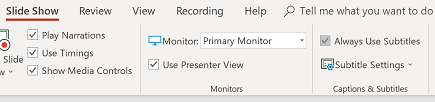
Present with real-time, automatic captions or subtitles in PowerPoint (opens in a new tab)
Voice
Your voice is one of the import important tools you have to engage your audience (although I have seen a speaker present with no voice). If you sound bored, why should the audience listen to you? Whereas if you sound excited, that excitement is infectious and it makes the audience feels like they should listen to you and be excited as well.
Try recording when you practice or ask for feedback when you practice with people, and see if you sound monotone, then try adjusting your pitch and tone. Some of the best advice I’ve received is to try reading children’s books (either to kids or a pretend audience). Children’s books are well paced and allow you to use a range of tones and voices, eg. Where did brown cow go? Where oh where is brown cow now?
Remember that your stance can also change your tone of voice. If you’re slouching your voice won’t carry as much, but if your chest is open your lungs and diaphragm can fully expand and your voice will carry further. Standing up is an easy way to make sure your chest is open, and if you’re sitting make sure that you sit up and keep your shoulders back.
Working on your voice also means working on your pace. This isn’t a competition of most words per minute, people need a chance to process the information you’re giving them. So stop, take a breath and slow down so you’re not talking too fast. If you find yourself having to talk fast to fit everything in, you’re trying to cram too much information into the wrong talk length, go back to your talk outline and start cutting out content that you don’t need.
Build a Speaker Pack
When you start getting into presenting at more events, it’s worth putting together a speaker pack. This pack will consist of different things depending on you and your requirements, but a good place to start is:
- A presentation clicker: a simple one from Officeworks is fine, but you can get fancier ones if you like
- A HDMI adaptor: if your laptop doesn’t have a HDMI port, make sure you have an adaptor for it. This isn’t somewhere you want to cheap out on either, make sure it’s a good quality one and if possible have a spare
As you present more and more, you can build out your speaker pack and include extra items like a portable second monitor, a fancier presentation clicker or different adaptors.
Resources
- Present with real-time, automatic captions or subtitles in PowerPoint (opens in a new tab)
- Interpreting for web geeks (opens in a new tab)
- Interpretation (opens in a new tab)
- Technically Speaking: How to be inclusive (opens in a new tab)
- Presentation Tips for Technical Talks (opens in a new tab)
- Multiple desktops in Windows (opens in a new tab)
- Work in multiple spaces on Mac (opens in a new tab)
- Screen mirroring and projecting to your PC (opens in a new tab)
- How to manage notifications (opens in a new tab)
- Speaker Skills Part 1 — Planning, Format, Structure, and Slides
- Visual Studio Code CodeTour Extension (opens in a new tab)